Saturday, March 20, 2010

Microsoft Hacked Symbian Samsung i8910 HD Into a Windows Phone 7 Series

At MIX10, Microsoft used a Samsung phone that resembled the original Microsoft Asus-sourced hardware, but Samsung says it didn't build that particular phone. Instead, it seems that Microsoft had obtained a Samsung i8910 HD, a Symbian model that isn't available in the US, and swapped out some components to make it meet the specs requirements for Windows Phone 7 Series.

The Redmond, Washington software maker changed the three buttons on the bottom to match the Windows Phone 7 Start, Back, and Search requirements, added a Qualcomm Snapdragon (or compatible CPU) processor, and included a WVGA screen--all of which are absent in the consumer release version of the Symbian powered Samsung i8910 HD. According to Samsung, "The launch was from Microsoft, not Samsung, and they used the i8910HD to demo Windows 7."

Samsung is listed as a Windows Phone 7 Series partner so even if the i8910 HD doesn't get a lobotomy from its Symbian roots and get a Windows Phone OS transplant, we can expect something from Samsung.

(via: TechRadar)
Read more

Thursday, March 18, 2010

FreeFSWP turns your standby screen wallpaper full screen, KeyLockClock shows the time when you lock your keypad

FreeFSWP full sceen wallpaper for Symbian mobile phones, 
KeyLockClock shows the time when you lock your keypad
FreeFSWP

Symbian's own wallpaper option won't display the top and bottom part of your image on your standby screen, but FreeFSWP by junnikokuki shows the full picture everywhere. It replaces your theme background with any image of your choice. On your standby screen, in the menu, in folders, and in every application that uses your theme image as background.

Version 1.01.1 fixes a wallpaper selection bug that bit some phones.

FreeFSWP only works on Symbian S60 3rd edition phones with feature pack 1 or older. This includes popular phones like the Nokia N82 and N95. It doesn't work on feature pack 2 phones like the Nokia N79 or S60 th ed. phones like the Nokia 5800XM. The program needs to be signed before you can install it, unless you've hacked your phone to get rid of the Symbian Signed madness.

The latest version is not yet available on the english part of the official site, but you can already get it from Mobile Castle.

FreeFSWP on junnikokuki's site
FreeFSWP 1.01.1 on Mobile Castle


KeyLockClock

KeyLockClock by DrJukka displays a clock on your screen when you lock the keypad. You can choose your own clock font and set the light timeout period.

KeyLockClock

Read more

VoIP and chat program Nimbuzz fixes Facebook chat name display bug

VoIP and chat program Nimbuzz fixes Facebook chat name display bug

Nimbuzz instant messaging VoIP SIP Skype
Chat and VoIP program Nimbuzz connects to Skype, standard SIP VoIP, GoogleTalk, Jabber, MSN (Windows Live), Yahoo, AIM, ICQ, Twitter, Gadu-Gadu, Facebook, MySpace, orkut, and Hyves. It does Twitter too.

The latest edition fixes some Nokia N97 specific issues, and kills a very annoying Facebook bug which used to bite many phones: many Facebook chat contacts were displayed as numbers, but now Nimbuzz shows the correct names.

Nimbuzz


Read more

eBuddy: new colors, old ads

eBuddy mobile phone instant messenger
Mobile Java multi-network chat program eBuddy connects to MSN, Yahoo, AIM, GoogleTalk, ICQ, and Facebook chat.

The latest edition uses less data, logs you in faster, fixes some annoying bugs (custom messages work again, no more double Yahoo entries), and it lets you choose the color of the user interface.

Unfortunately eBuddy displays a big ugly advertisement in your contacts list, and it can't send files or voice messages. You're better off with Nimbuzz, fring, Talkonaut, Palringo, or Slick. eBuddy is no longer a suitable choice for phones that run on Symbian 9.x.

eBuddy wants you to do an on the fly install from your phone browser, but you don't need to put up with that. Just select your phone brand and model from the dropdown boxes on get.ebuddy.com, download the jad file, and open it with a text editor to read the location of the corresponding jar file. Or download the jar and jad files from Mobile Castle.

eBuddy
eBuddy v1.4 on Mobile Castle
• check the instant messaging label for better chat programs

Read more

Jbak TaskMan


Jbak TaskMan, Sybian task manager and program launcher
Jbak TaskMan

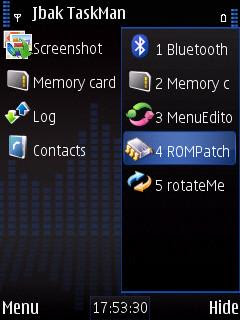
There's yet another test version of Jbak TaskMan. This program shows the running tasks on your phone, including hidden tasks that won't show up in Symbian's built-in task manager. Jbak TaskMan also displays memory status, disk usage, and detailed task info. When the program is running, long-pressing the menu button launches Jbak TaskMan instead of Symbian's built-in task manager.

The new test version fixes a few bugs, lets you set the font size in pixels, and the menus appear faster. And now Jbak TaskMan has a flashlight too. When you activate it, your screen turns bright white, but BrightLight and Light Control are better at turning your phone into a torch.

Jbak TaskMan v1.00 R16 is not available from Jbak's own site, but if you want to test it you can get it from Mobile Castle.

Jbak TaskMan site (latest full version and some test versions)
Jbak TaskMan v1.00 R16 (test version, unsigned) at Mobile Castle
Read more